



LESSON 3
Creating the Core Gameplay Mechanic
14 min read
Intro
So far, this course has emphasized the importance of a clear, fun, well-balanced central mechanic in creating casual games. Now it’s time to create it. But perhaps even more importantly, it’s also our chance to follow one of the most important lessons of this entire course—testing our game with real, human users, as early and often as we can.
The Plan: Core game mechanic first. Everything else second.
Our plan for this lesson is simple: keep working on the core mechanic until it tests well with players. Don’t proceed to polish and features until then. Now, to visualize this extremely simple concept, here’s a totally unnecessary flowchart. You’re welcome:
Balloon Buster: An example game to kick things off
To demonstrate this, I wanted to create a simple but plausibly fun game mechanic that could turn into a complete game if successful, but, on its own, is simple enough to create quickly.
Inspired by a painful memory of a childhood birthday party that I do not want to talk about, I came up with the idea of a mechanic in which the player uses a slingshot to shoot rocks at colorful balloons.
It’s important to be clear that this isn’t a game idea, but a game mechanic idea. And that’s the point—we want to test the core of a potential game, rather than wasting time on the game itself.
The creation wish
Here’s the creation wish that got it started. Note that I’m focused almost entirely on the mechanic itself, with just enough detail to be playable:
I want a large slingshot in the center of the bottom half of the screen that I can pull back to launch a rock. In the top half of the screen, colored balloons float by at different speeds and heights. Two randomly placed stone blocks, floating in the air, block the balloons and force them to flow around them. My job is to pop as many balloons with a single rock as possible. Once the rock hits the ground, tally the total number of popped balloons, show me my score, then repeat. For now I just want to test this core experience, so we'll add the game loop and other features later.
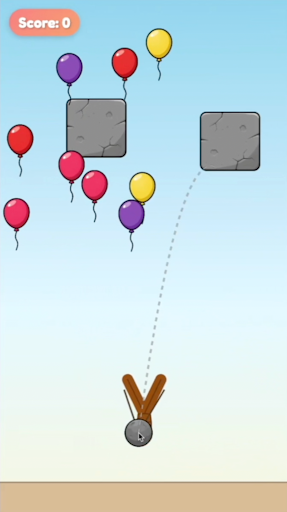
I want a large slingshot in the center of the bottom half of the screen that I can pull back to launch a rock. In the top half of the screen, colored balloons float by at different speeds and heights. Two randomly placed stone blocks, floating in the air, block the balloons and force them to flow around them. My job is to pop as many balloons with a single rock as possible. Once the rock hits the ground, tally the total number of popped balloons, show me my score, then repeat. For now I just want to test this core experience, so we'll add the game loop and other features later.
That first wish got me pretty close to a playable demo.
As you can see, it took a few more wishes to get it where I wanted it, but I remained focused on the mechanic itself. My only goal here was to make it just playable enough that a test subject could give me an authentic opinion about it.
That first wish got me pretty close to a playable demo.
As you can see, it took a few more wishes to get it where I wanted it, but I remained focused on the mechanic itself. My only goal here was to make it just playable enough that a test subject could give me an authentic opinion about it.
So we’re ready to test. Now what?
A TECHNIQUE WORTH MASTERING
The Astrocade Play Test Protocol
Testing an Astrocade game can be done in-person or remotely, via a platform like Discord. Both approaches have their merits; on the one hand, there’s no substitute for in-person testing for sensing nuance and detail in how a player reacts to your game. On the other hand, the Astrocade Discord offers far more test subjects than you’re likely to have access to at school, at work, or in your neighborhood.
Feel free to use whichever method suits you best.
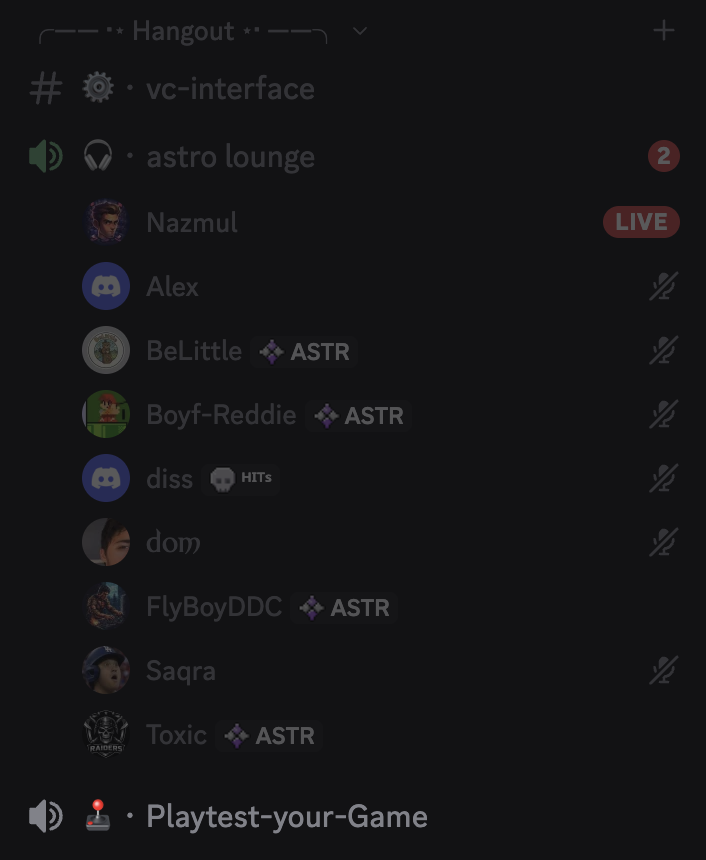
The Playtest-your-Game channel (seen here at the bottom of the Hangout section) was created specifically to give Astrocade creators a place to do live playtesting remotely.
Discord has been home to the Astrocade community for years, but it’s much more than a hangout spot for creators. When used properly, it can be a truly game-changing test platform.
Got something ready to test? Head to Playtest-your-Game, ask if anyone’s interested in testing your game, ask them to share their screen, then send them the link. The rest of this section explains what to do next.
The Playtest-your-Game channel (seen here at the bottom of the Hangout section) was created specifically to give Astrocade creators a place to do live playtesting remotely.
Discord has been home to the Astrocade community for years, but it’s much more than a hangout spot for creators. When used properly, it can be a truly game-changing test platform.
Got something ready to test? Head to Playtest-your-Game, ask if anyone’s interested in testing your game, ask them to share their screen, then send them the link. The rest of this section explains what to do next.
Play testing in person
First, let’s talk about in-person testing. Try to arrange a scenario something like the following:
- Pre-load the game: Hand them the device with the game already open and on the start screen. Do not make them navigate links or menus. (We aren’t testing download times or UI yet, so get the game ready to play.)
- Say nothing: Tell them you’d like to watch them play something, but don’t explain any of what they’re about to experience. Tell them that because this is a test, you can’t answer any questions, but encourage them to think out loud as they play.
- Positioning: Sit next to them, slightly offset. You need a clear view of the screen and their hands, but you need to see them too. Remember, their reaction is at least as important as what’s going on in the game, if not more so.
Play testing via Discord
Next, if you’re doing this via Discord:
- Start screen sharing first: Before anything happens, ask them to share their screen and, if they’re on desktop, share a single browser window with a blank tab. Send the link only after they’ve done this. This ensures you can watch every step from the very start. If anything goes wrong or doesn’t load right, you’ll see it.
- Say nothing: Tell them you’d like to watch them play something, but don’t explain any of what they’re about to experience. Tell them that because this is a test, you can’t answer any questions, but encourage them to think out loud as they play.
- Mic on: They won’t be able to type while playing, so it’s important they keep their mic on and share their reactions as vocally as possible.
What to look for while testing
Whether online or in person, here’s what to look for once testing begins:
- The first impression: What’s their immediate reaction? Do they hesitate (bad), ask you for help (bad), or jump right in and explore (good)?
- Time to fun: Track how long it takes them to figure out what to do. Remember, it’s okay for your players to be confused for a moment or two—what matters is how quickly they become un-confused.
- The Failure Reaction: When they lose, do they immediately try again (good), or do they act as if they’ve finished a chore and wait for you to say something (bad)?
- Unprompted Vocalizations: Even if you’re silent, your tester might talk. Listen for the difference between a frustrated "Oh come on!" (good—they sound invested) and a confused "Wait, what?" (bad—they sound confused).
After two to three sessions, you should have enough information to make an initial decision about your game mechanic. Is it awesome as-is? Does it need improvement? Or should it simply be abandoned?
We recommend organizing your observations into the following three categories:
- Comprehension: How well they understood what the game expected them to do
- Control: How well they carried those actions out
- Engagement: How much they seemed to enjoy the experience
Does your game make sense?
Here’s what to look for when evaluating comprehension:
- What to look for: The time it takes the player to execute their first intentional, meaningful action. Watch/listen for hesitation, random screen mashing, or, if in person, physical signs of confusion (squinting, tilting the head).
- The Conclusion: If the player hesitates for longer than you expect, the objective or the interactive elements are not visually legible.
- Next Step: Adapt. Alter shapes, contrast, or camera angles so the interactable objects stand out. If the mechanic is so complex that visual changes cannot explain it without text, it might be worth abandoning for something simpler.
How does your game play?
Here’s how to evaluate your game’s controls:
- What to look for: Mismatches between the player's physical instinct and the game's requirement. Watch for players trying to swipe when a tap is required. Listen for vocalized frustration directed at the game ("Bro I pressed it!", "It didn't jump!").
- The Conclusion: The inputs are unintuitive, the physics parameters (gravity, friction) are incorrect, or the hitboxes are too exact.
- Next Step: Don’t try to argue—the player's physical instinct is always right. Tune the physics variables to match their expectations, expand bounding boxes, or remap the controls to match the gesture they are naturally trying to perform.
Is your game fun?
Most importantly, here’s how to figure out if they’re having fun in the first place:
- What to look for: The immediate physical and emotional reaction to the first fail state. Do they rapidly tap the screen to try again, suggesting genuine interest, or do they break focus, relax their posture, and hand the device back (or, if testing via Discord, simply stop and wait for you to react)?
- The Conclusion: The core loop either successfully triggers the compulsive "one more try" loop, or the underlying verb is inherently boring and feels like a chore.
- Next Step: If they compulsively restart and blame themselves for failing, you are good to go! Build that game, because you might have a hit on your hands! If they look relieved that the round is over, abandon the mechanic entirely and start over.
A real-world play testing example
To test Balloon Buster, I asked three of my coworkers here at Astrocade—@olivia, @manvi, and @cap—to test the game over Discord. In addition to taking notes, I also recorded the sessions to show exactly what a productive test session is like. Note that in just a few minutes, each subject played through the mechanic repeatedly, discovering new details each time, and providing me with a ton of useful information.
Test Subject #1: @Olivia
- Likes the sound effects - Understands the basic game mechanic - Wasn't immediately sure what the curved line meant, but seemed to figure it out - Discovered a way to bounce the rock on the blocks for extra points - Wanted to know if the balloon colors mean something - Compared the game to Breakout - Seemed confused when the ball went off the screen - Gap between randomly placed blocks is confusing/frustrating
Test Subject #2: @Manvi
- Doesn't like the wait in between shots; might prefer the ability to keep shooting (reloading?)
- Had a few bad rounds in a row but seemed to have fun with it; laughed when the shot went wrong
- Really wants opportunities to pop more balloons - Tried to strategize angles based on block placements but still found their placement frustrating - Despite frustration, kept playing! ("I just wanna keep popping them") - Suggested a freestyle mode with the ability to pop a much larger amount of balloons - Confused by delay between the end of the round and the score display
- Wants more bouncing
Test Subject #3: @Cap
- Likes the trajectory line - Also thrown off the ball going off screen rather than bouncing off the side - Also noticed the delay before the score appears - Tried to grab the rock to reload (might also want multiple shots per round) - Definitely wants to fire more stones - Experimented a lot with strategy regarding block placement

Remember: You don’t have to make all the changes your test players suggest. But you must consider them.
Drawing Conclusions
All in all, I consider the tests a successful validation of the game mechanic. Although I got a lot of great ideas for how to improve it, each player seemed to more or less understand and enjoy it—two requirements for any good game experience—telling me I should feel confident building a full game around it.
What’s working:
- Game mechanic seems like a good one! Players seem to like the pull-back motion, balloon popping, and general physics.
What’s not working:
- Block placement should be less random, allowing for better strategies and less frustration.
- Make the rock bounce off the sides of the screen, and consider adding a visible wall to make that clear to the player.
- Reduce the delay before the score appears (confusing)
Ideas for refinements:
- Consider giving each balloon color a different point value or make them all the same.
- Consider adding multiple shots per round.
A final note: How much should you refine before testing?
So far I’ve tried to be as clear as possible about one thing: refinement, features, and polish should come after you’ve successfully proven that players like your game mechanic through real testing.
But there’s one important exception to this: polish and refinement is necessary when it fundamentally changes the appeal of that central mechanic. For example, a game mechanic that involves firing a bazooka may only “feel right” when there’s a huge recoil that sends the player flying backwards with each shot, adding to the challenge of the game. Likewise, a physically accurate explosion with flying shrapnel and falling debris may also be an essential ingredient in the experience. On the other hand, a level select screen or realistically billowing hair on your main character are likely not required and simply waste time and effort that could be spent validating the mechanic itself.
Here are some examples that will hopefully make it easier to decide which forms of polish are worth including before testing, and which should be saved until after:
Game mechanic type: Launching Rockets
A heavy recoil/kickback effect
Very likely necessary! The player feels this every time they fire, thus making it a big part of the experience.
Rocket upgrades
Not likely necessary. If the default rocket isn't fun, upgrades won't change anything. Save it for later.
A shockwave that pushes objects away from explosions
Very likely necessary! These kinds of fundamental physics are a huge part of what make game mechanics fun and give the player strategic options.
Glowing rocket exhaust
Not likely necessary. Although this will probably look cool, it's unlikely to be the reason a player likes or dislikes the mechanic itself. Save it for later.
Game mechanic type: Growing vegetables
Leaves blowing in the breeze
Not likely necessary. Whether or not it's fun to grow vegetables doesn't depend on details like this.
A "pop" effect when a vegetable is pulled from the ground
Quite possibly necessary! This sort of feedback might be the key detail that makes players want to grow more crops.
Changing seasons
Very unlikely to be necessary. Whether or not the player wants to grow a farm surely won't depend on something like this.
Game mechanic type: A block-breaking puzzle
Colorful block explosions
Maybe necessary, maybe not. Sometimes these details are what make a game mechanic fun, but in other cases they're a shiny distraction that clouds the player's ability to judge the game fairly. You'll have to decide this for yourself on the basis of how important you consider this to the core experience.
A combo system
Probably not necessary. Unless you consider combos to specifically be a fundamental part of your game mechanic—not the game as a whole, but the moment-to-moment play experience—don't waste time on a combo system before testing the game mechanic itself.
Leaderboards
Definitely not necessary! Leaderboards are a long-term player objective that go way beyond a game mechanic.
Here’s the bottom line when it comes to deciding whether a given refinement is worth including before or after testing:
If a detail feels like it’s part of the reason why the game is fun from one moment to the next, it’s probably worth including before testing. But if it adds to the game’s visual beauty or long-term engagement, it’s likely not.
Onward, cadet! To the exercises!
Exercise
Create and test your game mechanic!
This lesson’s exercise is your first real step towards creating a successful casual game.
First, wish for the central game mechanic outlined in your GDD from the previous lesson, making as many edit wishes as are required to get that mechanic where you want it. Do not add new features, juice, or stylistic effects. Add just what’s necessary for the core mechanic to be as clear and playable as possible.
Next, use either the in-person or Discord-based versions of the Astrocade Play Test Protocol to get your first round of feedback! Three different test subjects would be great, but get as many as you can; even one is a huge improvement over none!
If the results are encouraging, move on to the next lesson. If not, try this one again.