



LESSON 7
Optimizing Your Game's Download Time
9 min read
Intro
Did you know one of the most common reasons games fail on Astrocade has nothing to do with their design? No matter how finely tuned your game mechanic, and no matter how juicy the… juice, people simply won’t play it if it takes too long to download. To make things even more complicated, with users all over the world, many of those players’ internet connections may be significantly slower than yours. This lesson will explore ways to understand, diagnose, and fix download speed issues.
Reality check: FTUE and TTF begin the moment they press play
In web-based games like those on Astrocade, the user’s first impression doesn’t begin when the game starts, but when it starts downloading. This makes the download itself, whether it lasts two seconds or two minutes, the first (and often most consequential) part of your game’s TTF, and a potentially huge part of the user’s first impression. So it should come as no surprise that games with long download times tend to lose players well before anything fun happens (Source).
This can be a frustrating challenge. But reducing your game’s download time can drastically improve game performance, which makes it among the most important techniques to learn as a creator.
Let’s start by learning how to measure a game’s download time using the Chrome desktop browser.
Measuring your game's download time
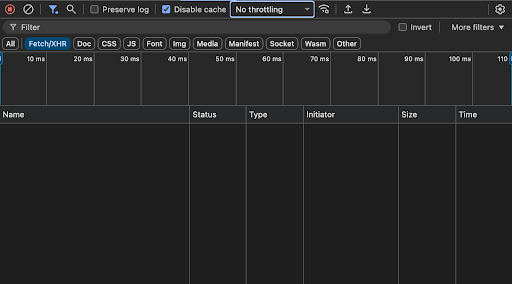
The Developer Tools pane in Chrome
First, open a fresh window in Incognito Mode, which disables most browser extensions and ensures a blank slate by ignoring any previously cached local data.
Next, enable View → Developer → Developer Tools. This brings up a special panel that allows you to simulate slower download speeds and watch the precise order in which your game’s assets load. Check the Disable Cache checkbox.
The Developer Tools pane in Chrome
First, open a fresh window in Incognito Mode, which disables most browser extensions and ensures a blank slate by ignoring any previously cached local data.
Next, enable View → Developer → Developer Tools. This brings up a special panel that allows you to simulate slower download speeds and watch the precise order in which your game’s assets load. Check the Disable Cache checkbox.
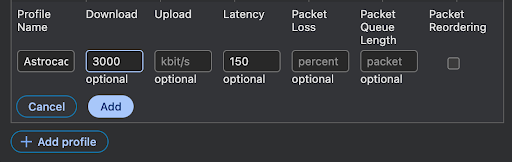
Creating a custom download speed profile
Now, in order to simulate a lower-bandwidth connection, click the dropdown menu that reads No Throttling and select Add… (under the Custom submenu). In the panel that appears, click + Add Profile. Here, we can dial in the exact connection simulation we want. Set the Download speed to 3000 kbps and Latency to 150 ms.
At this rate, your game should download in no more than 10 seconds!Creating a custom download speed profile
Now, in order to simulate a lower-bandwidth connection, click the dropdown menu that reads No Throttling and select Add… (under the Custom submenu). In the panel that appears, click + Add Profile. Here, we can dial in the exact connection simulation we want. Set the Download speed to 3000 kbps and Latency to 150 ms.
At this rate, your game should download in no more than 10 seconds!
TIP
I find it handy to save this as a profile for easy reuse. Just make sure to create the profile before entering Incognito Mode, as Chrome won’t save it, otherwise.

10
Seconds
The maximum amount of time a game should take to download at 3000 kbps.
Start measuring download times the moment you press the play button
With our custom download profile selected in the Throttling menu, paste in the URL to your game. Press the play button when it appears. This is the moment from which your game’s download time (and thus, its TTF) can be measured.
Now, let’s take a look at two very different pictures of what might come next.
Start measuring download times the moment you press the play button
With our custom download profile selected in the Throttling menu, paste in the URL to your game. Press the play button when it appears. This is the moment from which your game’s download time (and thus, its TTF) can be measured.
Now, let’s take a look at two very different pictures of what might come next.
Worst Case Scenario: Iron Wing
We begin with an example of an utterly embarrassing worst case scenario, courtesy of uh… well… me. To the left is a video of the time it takes to load my excessively detailed and criminally unoptimized steampunk shooter Iron Wing. Its resource requirements (including music and sound) are so burdensome that a player on a slow connection will have to wait an incomprehensible 20 seconds before they can even see anything from the time they hit play. I might as well have shipped it on a thumb drive.
Some say Iron Wing is still downloading to this day
A Worthy Example: Knife Blitz 2
In contrast, take a look at Knife Blitz 2, a deservedly successful game from the far more responsible creator @Majisok.
First, note that they had the good sense to display a loading screen so players wouldn’t be staring into the abyss that I subjected them to. Furthermore, even with a slight hiccup at 89%, the entire game is loaded and ready to go in well under 10 seconds on a connection of the exact same speed.
Now THIS is how you load a game
What good vs. bad looks like in data
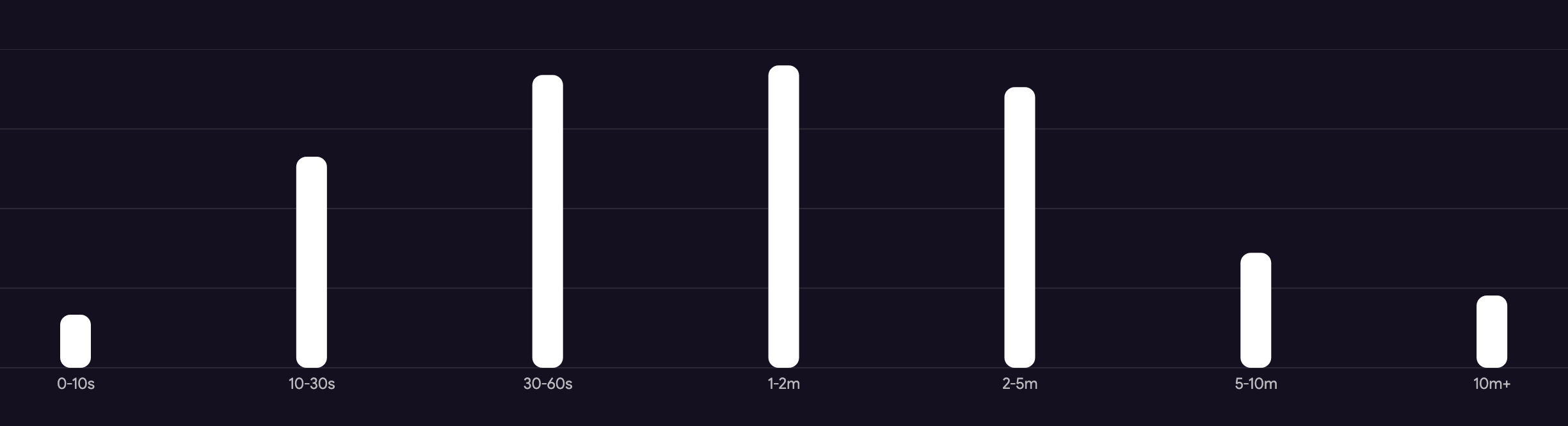
Sure enough, we can see the difference in the data. Notice that Iron Wing’s play session length breakdown features a surprisingly large number of plays that end at or below just 10 seconds, around the time low-bandwidth players probably decided they could code their own game from scratch before my 10-ton magnum opus finished downloading:
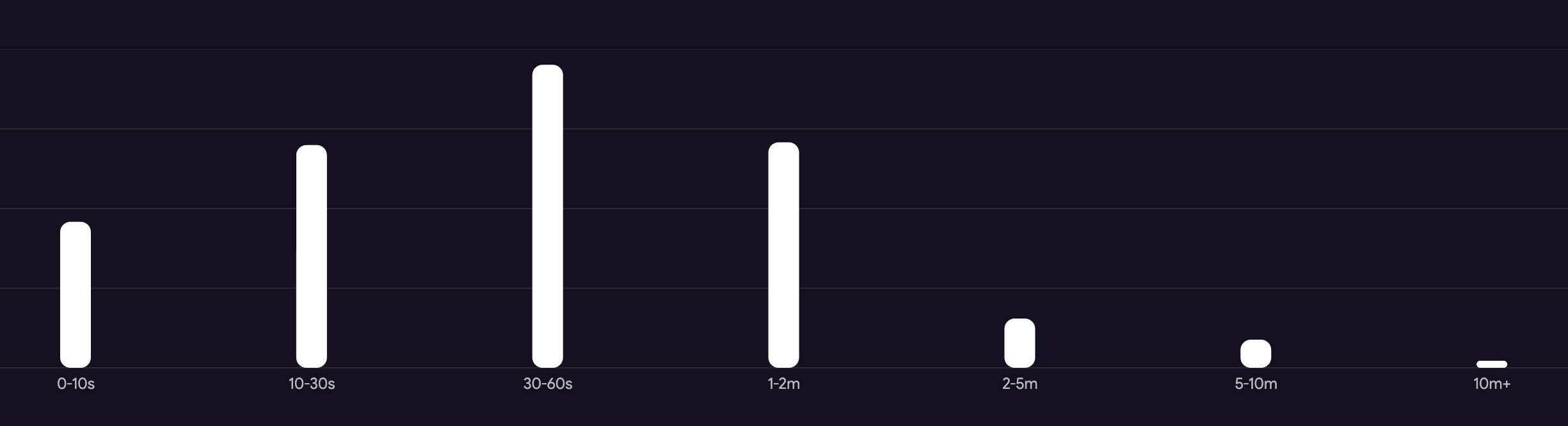
Meanwhile, Knife Blitz 2 boasts a much more typical distribution in which only a small fraction of players bail within this time:
Optimizing your game's download experience
Now that you know how long your game takes to download, what can you do to improve it? For now, we’re going to focus on two recommended practices:
- User awareness: Create a loading screen to ensure your players aren’t confused or left hanging as your game downloads.
- Download priority: Split your game’s assets into those which must be loaded before it can start—the bare minimum for playability—and those which can be loaded in the background after the game gets going. The player should only have to wait for the former.
TERM TO KNOW
“Lazy Loading”
We normally think of downloading as something that happens before a game is played, but most games feature numerous assets that either aren’t seen until later in the game, or aren’t strictly required at all. In these cases, a game can load them only when they’re needed, at the last moment—a term called lazy loading.
Background images are a great example. Your level 10 backdrop obviously shouldn’t slow down a player starting the game at level 1. But even the level 1 backdrop can be delayed! Your game may look a bit blank for a few seconds while it loads, but if it gets the player into the game faster, it may be worth the trade-off.
More on this in a moment.
A demonstration: Optimizing Starboy: Way of the Shuriken
Starboy: Way of the Shuriken is a tutorial game I created to demonstrate creating a complete game with Astrocade. One thing I neglected to include, though, was any information on download optimization.
Thankfully, it loads more or less fine on the simulated slow connection, at just under 7 seconds. But it’s clearly loading everything up front, including numerous big, non-essential assets, and it totally lacks a loading screen.
Here’s how to fix both in just two wishes.
Starboy: Way of the Shuriken is a tutorial game I created to demonstrate creating a complete game with Astrocade. One thing I neglected to include, though, was any information on download optimization.
Thankfully, it loads more or less fine on the simulated slow connection, at just under 7 seconds. But it’s clearly loading everything up front, including numerous big, non-essential assets, and it totally lacks a loading screen.
Here’s how to fix both in just two wishes.
Adding a loading screen
Loading screens are easy to add, but I strongly recommend finding ways to dress them up to keep the player interested. This is tricky, though, because any fancy visuals you might want to generate as a background or whatever will only increase the loading time, thus defeating the purpose.
I like solving this problem by finding creative ways to use the assets I’m already using, so the net download time is the same. I then ask that those assets be loaded first so I can put them to use while the rest come through:
Start the game with a simple loading screen featuring a red loading bar on a black background. Load the player texture first, and display it smoothly hovering over the loading bar once it's downloaded.
Here's the result, running with the download timer visible:
Nice, huh? Seven seconds goes by a lot faster when the player isn’t in the dark, and the hovering ninja is a fun touch that keeps things visually interesting without increasing the download burden.
Still, though, there’s a lot this game loads up front that isn’t needed until long after the game starts. So let’s start prioritizing.
Essentials vs. lazy loading
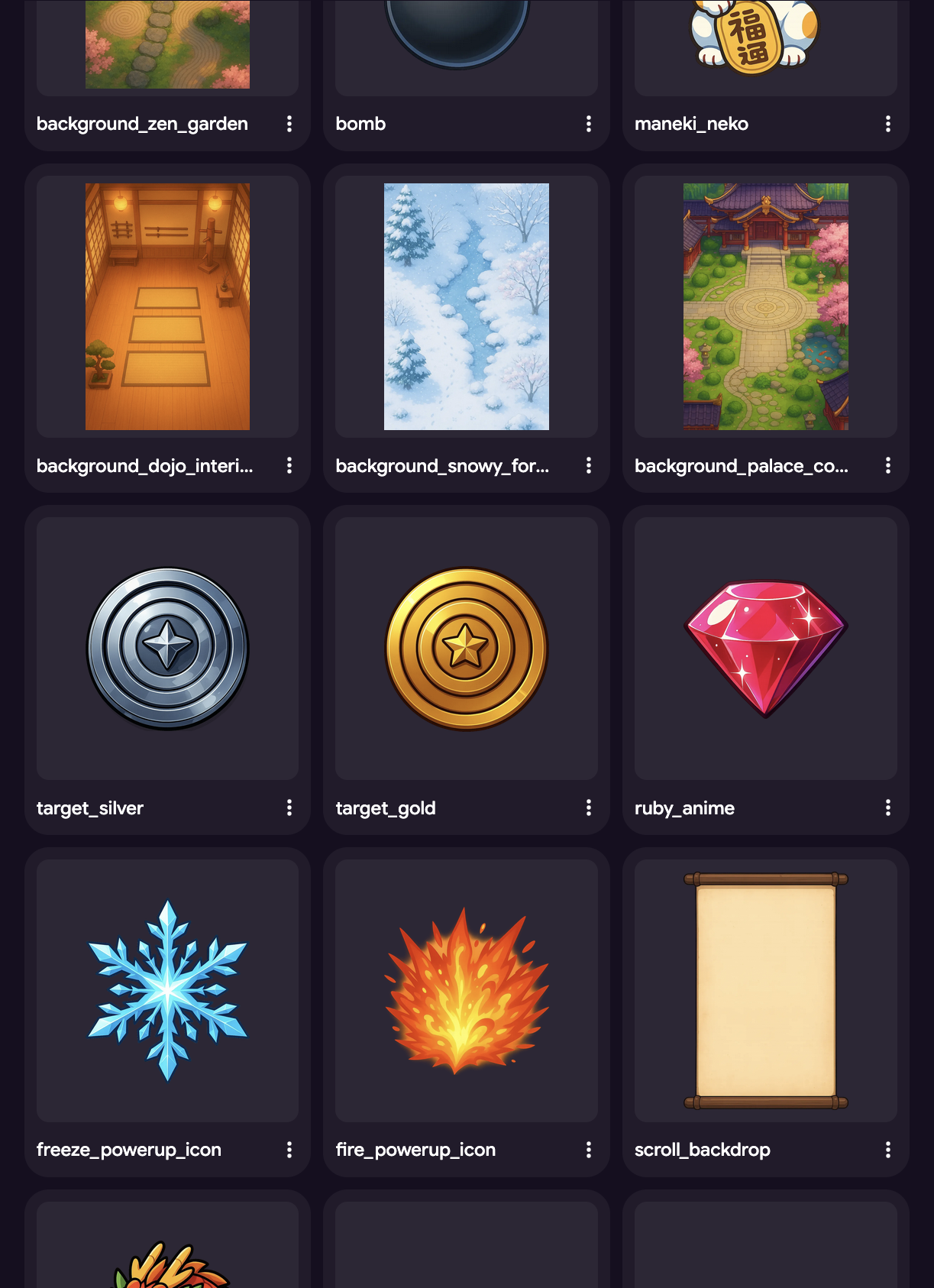
It's clear that not all of these assets are needed at the start of the game. Some, in fact, like level backgrounds, may not be needed until many minutes in.
Starboy features four full-screen backdrops, only one of which is seen on the first level. And even that isn’t required to start the game; things may look a bit incomplete for the first few seconds on slow connections, but I’ll take it if it means losing fewer players. A perfect example of strategic lazy loading.
Using the Media tab, I made a list of everything that feels essential to the core game mechanic: the player, the targets the player has to hit, the shuriken they throw, and the rewards they earn. Everything else can come later.
It's clear that not all of these assets are needed at the start of the game. Some, in fact, like level backgrounds, may not be needed until many minutes in.
Starboy features four full-screen backdrops, only one of which is seen on the first level. And even that isn’t required to start the game; things may look a bit incomplete for the first few seconds on slow connections, but I’ll take it if it means losing fewer players. A perfect example of strategic lazy loading.
Using the Media tab, I made a list of everything that feels essential to the core game mechanic: the player, the targets the player has to hit, the shuriken they throw, and the rewards they earn. Everything else can come later.
ONLY the following should be loaded during the loading bar: ninja_character, ninja_throwing, shuriken, target_basic, target_gold, target_silver, ruby_anime. ALL other assets should be lazy loaded once the game starts, appearing in the game only when available.
Here’s how I wished for just enough to get the game going while the rest loads in the background at its own pace:
Ta-daaaa!!!!
How amazing is this!? Sure, players on slow connections get a few janky-looking seconds at the very start of the game, but it’s still playable. More importantly, they get to that playable moment three times faster! Not bad for one extra wish.
Starboy was never facing major download issues, but between the UI improvement and the speed boost, I can now rest easy knowing I’ve done everything I can to prevent unnecessary player loss.
When should you optimize your game's download time?
The way a game downloads can change dramatically over the course of its development; each wish can potentially add new assets, change existing ones, or modify the order in which they appear. This makes your game’s download strategy a moving target as long as you’re still working on it, which is why it’s best to try optimizing it only at the end of the creation process, when things have stabilized. Otherwise, you run the risk of wasting your time with optimization efforts that will be undone later on.

Onward, cadet! To the exercises!
Exercise
Define your core and meta!

Click here
Add the final touch to your GDD by thinking through a download strategy. First, consider the player experience at the very start of the game—what the game looks like, what the player is doing, and so on—to decide which assets are essential to get the game going. List them by name using the media tab, leaving the rest (those not named) to be lazy loaded.
Then, try to think up a creative way to use the assets you’ll be loading during this period to make your loading screen more memorable than a blank backdrop.
Quiz
Lesson Recap
Click here
Finally, to complete this lesson, check out the linked form for a simple recap quiz that tests your knowledge of this lesson’s most important concepts.
Don’t worry, it’s easy (and open book 👀)!